What a Funnel Builder's Contact Limit Counts
The contact row is the line that forces most upgrades, and it rarely counts what buyers assume. Unsubscribed people usually still count; archived people usually do not. Here is what five vendors publish about the contact row, read on October 10, 2026.
This article is a documentation review: it is based on the vendors' own published pages, checked on the date shown. We may earn a commission from some links; it never affects what we recommend.
On most platforms, a contact limit counts every unique person in the database who has not been archived or cleaned, including people who already unsubscribed. Mailchimp publishes this explicitly: subscribed, unsubscribed and non-subscribed contacts all count, while cleaned, pending, archived and deleted contacts do not. MailerLite bills on "active subscribers," Kit counts subscribers who are "unique and active," and ClickFunnels, Kartra and Kajabi publish a number without publishing a definition. This note sets out what each vendor states, as read on October 10, 2026, and what to do when the row is nearly full.
Mailchimp is the only vendor here that publishes a full status table
Its help centre lists each contact type against the plan limit. Subscribed counts. Unsubscribed counts. Non-subscribed, meaning someone who bought or submitted a form without opting in, counts. Cleaned, pending, archived and deleted do not count.
That table changes how a list should be managed. Unsubscribing somebody does not reduce the bill. Archiving them does, and archiving keeps the record for compliance while removing it from the billable count.
The page also states what happens at the ceiling: "if you hit your contact or sending limit, Mailchimp will automatically bill you for your overages." An overage is a charge, not a block, so the cost arrives without an upgrade decision.
Mailchimp's send allowance is tied to the same row. Essentials allows "10X contacts" a month, Standard "12X contacts" and Premium "15X contacts," per the pricing page checked October 10, 2026. A bloated list therefore inflates two lines at once.
MailerLite and Kit both say active, and define it loosely
MailerLite states that "billing is based on the number of active subscribers in your account" and that this "includes anyone with an 'active' status." Its free tier allows 250 subscribers and 2,500 monthly emails, with paid tiers starting at $12 a month.
MailerLite ties sends to the tier ceiling rather than the actual count: the Comfort plan allows "10x the ceiling of your subscriber tier each month." Power lists unlimited monthly emails. Both figures are from the pricing page as of October 10, 2026.
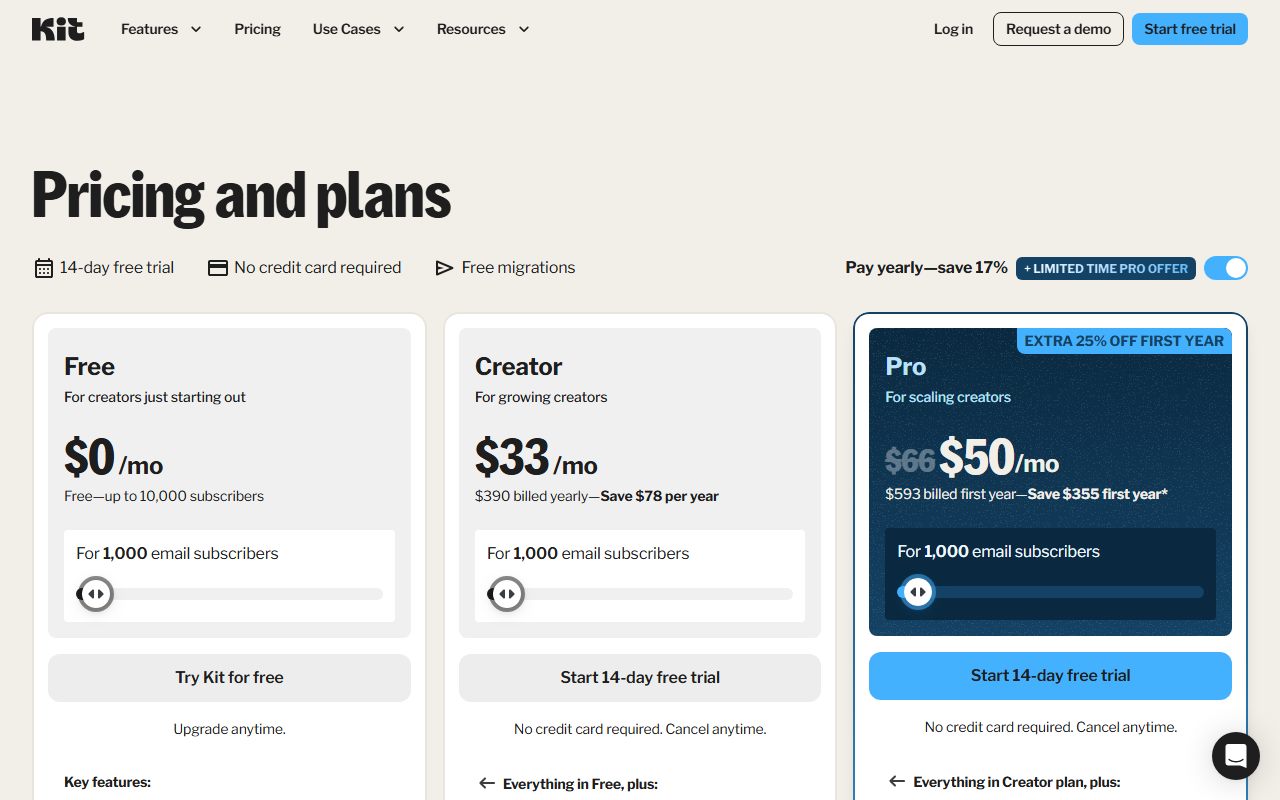
Kit says "subscribers are only counted if they are unique and active." Its free plan runs up to 10,000 subscribers, and the Creator plan is $33 a month at 1,000 subscribers, or $390 a year. The page does not define inactive.
The practical difference between these phrasings and Mailchimp's table is certainty. A table you can plan against. A word like active has to be confirmed inside the account, which is one more thing to check during a trial.
Funnel builders publish the number and skip the definition
ClickFunnels labels the row "Email Contacts" and sets it at 10,000 on Launch, 75,000 on Scale, 150,000 on Optimize and 400,000 on Dominate. It publishes no rule for unsubscribed or inactive records on the pricing page.
Kartra calls them leads: 500 on Essentials, 2,500 on Starter, 12,500 on Growth and 25,000 on Professional. Those are the tightest entry caps in this group, and Essentials also allows only 5 pages and 1 product.
Kajabi sets contacts at 2,500, 25,000 and 100,000 across Basic, Growth and Pro. Its help centre does not define a contact either, but it does describe what happens when the row fills, which no other vendor here publishes.
GoHighLevel prints "Unlimited" contacts on Starter, Unlimited and Agency Pro. The cost moves to usage instead: its pricing page states that "usage-based costs" apply to "phone numbers, SMS (text messaging), emails sent, and premium AI usage."
Kajabi publishes the only clear overage behaviour in this group
Its help centre states that at 90% of contact usage "you will see an in-app notification and banner upon login." At 100%, an email arrives and "you will be given 30 days to update or remove your contacts before your account is locked."
A lock is a harder outcome than an overage charge, and a 30-day window is a real deadline. The same page advises deleting contacts that are not customers, are unsubscribed, and were not added in the last 60 days.
That advice is a useful default anywhere. Unsubscribed non-buyers added more than two months ago are paid storage with no path to revenue, whichever platform holds them.
The cheaper fix is to stop adding people who will never buy. A sequence that sorts buyers from browsers in the first week is described in how to build a welcome email sequence.
How to size the row before you buy
- Export the real list and count unique email addresses, not rows. Duplicates across forms are common and most platforms deduplicate, so the raw export overstates the bill.
- Count unsubscribed contacts separately. On Mailchimp they count; archive them before the first invoice rather than after.
- Count non-opted-in buyers and form fills. Mailchimp's non-subscribed status counts toward the limit, and that group is invisible in most list views.
- Add twelve months of expected growth, then price the tier above that number, since annual billing locks the cap for a year.
- Check the send multiple on the same tier. A 10x multiple on 5,000 contacts is 50,000 emails, which three campaigns a week will reach.
- Confirm the overage rule in writing: automatic billing, a soft warning, or a lock with a deadline.
Doing this during a trial rather than after signup is the whole point of the trial. The day-by-day version is in the funnel builder free trial checklist, which puts the real list import on day one.
Frequently asked questions
Do unsubscribed contacts count toward my plan limit?
On Mailchimp, yes. Its help centre lists subscribed, unsubscribed and non-subscribed as counting toward the monthly contact limit, while cleaned, pending, archived and deleted do not. ClickFunnels, Kartra and Kajabi publish no rule either way.
What is the difference between archiving and unsubscribing?
Unsubscribing stops the email and keeps the billable contact. Archiving removes the contact from the billable count while keeping the record, per Mailchimp's contact type table checked October 10, 2026. Archive first if the goal is a smaller bill.
Which platforms have no contact limit?
GoHighLevel prints unlimited contacts on all three published plans, and systeme.io's Unlimited plan at $97 a month lists contacts as unlimited. GoHighLevel moves the cost to usage billing for SMS, phone, email sends and premium AI.
What happens when I go over the limit?
It differs by vendor. Mailchimp states it will "automatically bill you for your overages." Kajabi warns at 90% and gives 30 days at 100% before the account is locked. The other vendors here publish no stated behaviour.
Does the contact limit affect how many emails I can send?
Usually yes. Mailchimp allows 10x, 12x or 15x contacts a month by tier, ActiveCampaign's page lists the same 10x to 15x pattern, and MailerLite's Comfort plan allows 10x the tier ceiling. One row sets two limits.
Is the cheapest tier ever enough?
Rarely for a list, often for a test. Kartra Essentials allows 500 leads, MailerLite's free plan 250 subscribers and Mailchimp's free plan 250 contacts with 500 monthly sends. Kit's free plan is the outlier at 10,000 subscribers.
Bottom line
Treat the contact number on a pricing page as a billing unit with a vendor-specific definition, not a count of customers. Where the definition is published, read it. Where it is not, confirm it in the account before the second invoice.
Then size the tier against unique, active, opted-in people plus a year of growth, and check the send multiple on the same line. Every figure above comes from the vendors' own pages on October 10, 2026.
Related reading: how to read a funnel builder pricing page, how to read an email automation pricing page, ClickFunnels vs systeme.io, Kajabi vs Kartra for selling a course and what a landing page builder's entry tier includes.
Sources
- Mailchimp help: about your contacts (which statuses count toward the limit) (checked Oct 10, 2026)
- Mailchimp marketing pricing (send multiples, overage wording, free tier) (checked Oct 10, 2026)
- MailerLite pricing (active subscriber billing, tier ceiling send rule) (checked Oct 10, 2026)
- Kit pricing (unique and active subscriber wording, free tier) (checked Oct 10, 2026)
- Kajabi help centre: understand contact usage limits (90%, 100%, 30-day window) (checked Oct 10, 2026)
- GoHighLevel pricing (unlimited contacts, usage-based charges) (checked Oct 10, 2026)