How to Read an Email Automation Pricing Page
Email tools advertise a price for the smallest contact tier and hide the real cost in three rows: the contact definition, the send multiple and the seat count. Here is the order to read them in, with figures from four vendors checked October 10, 2026.
This article is a documentation review: it is based on the vendors' own published pages, checked on the date shown. We may earn a commission from some links; it never affects what we recommend.
Start at the contact slider, not the price. Almost every email automation page advertises its cheapest tier at 500 contacts or fewer, then scales the price with the list. Mailchimp Essentials is $13 a month at the 0 to 500 band and Standard is $20; MailerLite starts at $12; Kit Creator is $33 at 1,000 subscribers. The second row to read is the send allowance, because it is a multiple of contacts rather than a fixed number. The third is seats. All figures below come from the vendors' pricing pages as read on October 10, 2026.
Move the contact slider to your real list before reading any price
The headline figure is the smallest band. Mailchimp's $13 Essentials and $20 Standard prices apply to the 0 to 500 contact tier, and the page notes a 15% discount for accounts above 10,000 contacts held for twelve months on Standard and Premium.
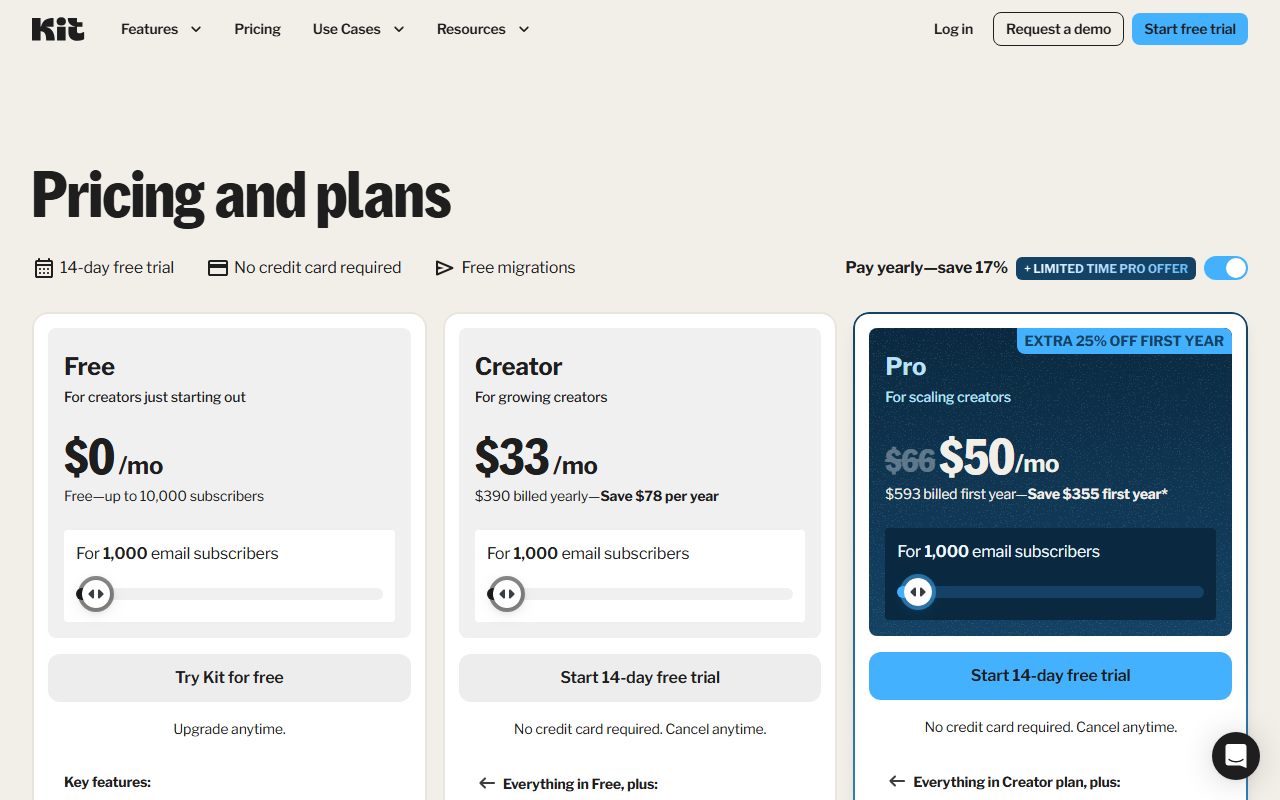
Kit prices differently, advertising Creator at $33 a month for 1,000 email subscribers and Pro at $66, with a free plan listed up to 10,000 subscribers. MailerLite's free tier stops at 250 subscribers and 2,500 monthly emails.
That free-tier spread is the widest gap on any of these pages. Kit's 10,000 against MailerLite's 250 is a difference of two orders of magnitude for the same price of nothing, so the free row is worth reading before the paid ones.
Then confirm what the slider is counting. Unsubscribed people usually still count, and the vendor-by-vendor detail is in what a funnel builder's contact limit actually counts.
The send cap is a multiple, so it moves when the list moves
Mailchimp states Essentials allows "10X contacts" a month, Standard "12X contacts" and Premium "15X contacts." ActiveCampaign's page uses the same pattern: "10x contact limit" on Starter and Plus, "12x" on Pro and "15x" on Enterprise.
MailerLite words it against the tier rather than the actual list: the Comfort plan allows "10x the ceiling of your subscriber tier each month," which is more generous than 10x the live count. Power lists unlimited monthly emails.
Convert the multiple into campaigns. A 10x allowance is ten emails per contact per month, which is roughly two campaigns a week plus a short automation. Add a cart sequence and a weekly newsletter and the allowance is spent.
Mailchimp's free plan shows how tight a fixed cap feels by comparison: 250 contacts with a "Max of 500/mo or 250/day." That is two sends per contact per month, which cannot carry a launch.
Count seats, because the cheap tier usually includes one
Mailchimp lists 1 seat on Free, 3 on Essentials, 5 on Standard and unlimited on Premium. ActiveCampaign lists 1 user on Starter and Plus, 3 on Pro and 5 on Enterprise. MailerLite lists 2 seats on Free, 3 on Comfort and unlimited on Power.
Kit lists 1 user on Free, 2 on Creator and unlimited on Pro. A second person who needs to send a campaign is therefore a tier upgrade on four of these four vendors, not a per-seat add-on.
This is the opposite of how funnel builders price seats. ClickFunnels publishes 2 team members on Launch and 20 on Dominate as part of the plan, as covered in ClickFunnels vs systeme.io.
Find the overage rule, and prefer a warning to a charge
Mailchimp states that "if you hit your contact or sending limit, Mailchimp will automatically bill you for your overages." That is an automatic charge rather than a prompt to upgrade, so the first notice can be the invoice.
Most other pages say nothing. When a page is silent, the rule has to be confirmed in the account or in writing from support before the second billing cycle, because the two possible outcomes are a surprise charge and a paused send.
Set a calendar check at 80% of the contact cap, whichever vendor you pick. Kajabi, on a different product, warns at 90% and locks at 100% after 30 days, which shows how late an in-app warning can arrive.
Watch for the figures the page will not render
ActiveCampaign is a live example. Its pricing page carries the static feature rows, including the 10x to 15x send multiples and the 1, 1, 3 and 5 user counts by tier. The dollar amounts load dynamically and did not render.
Two retrieval attempts on October 10, 2026 returned the feature rows and no prices, and the vendor's billing help article returned an HTTP 403. No ActiveCampaign price is quoted here for that reason, and no estimate is offered in its place.
This pattern is common on enterprise-leaning pages. Where a vendor shows "Custom" or "contact sales," record it as contact sales and move on, because any number written next to it would be invented.
The reading order that saves the most money
- Set the contact slider to your real unique, active list, then read the price.
- Convert the send multiple into campaigns per month and check it against your actual sending plan.
- Count seats against the people who will log in, including a bookkeeper or contractor.
- Find the automation or workflow count, since MailerLite caps Comfort at 50 automations and its free plan at 3.
- Find the overage rule and whether it bills, warns or blocks.
- Check the annual discount wording, then stay monthly until two or three cycles confirm the tier.
Running those six rows takes about ten minutes per vendor and is the only part of the decision a trial cannot shortcut. What the trial is for instead is covered in the funnel builder free trial checklist.
Frequently asked questions
Why is the advertised email tool price always so low?
Because it is quoted at the smallest contact band. Mailchimp's $13 Essentials and $20 Standard prices apply to 0 to 500 contacts, and the figure rises with the slider. Set the slider to your real list before comparing anything.
What does a 10x send limit mean?
Ten emails per contact per month. On a 5,000 contact plan that is 50,000 sends, which covers roughly two campaigns a week plus one automation. Mailchimp uses 10x, 12x and 15x by tier; ActiveCampaign's page lists the same pattern.
Which email tool has the most generous free plan?
Kit, on published numbers: up to 10,000 subscribers at $0 with 1 user. MailerLite's free plan allows 250 subscribers and 2,500 monthly emails with 2 seats; Mailchimp's allows 250 contacts and 500 monthly sends with 1 seat.
Should I buy annual billing on an email tool?
Not in the first month. Annual billing locks the contact tier for a year, and list growth is the thing most likely to break it. Check the claim too: Kit prints "$33/mo" and "$390 billed yearly, Save $78 per year," which do not reconcile.
What happens if I exceed the send limit?
Mailchimp states it bills overages automatically. The other pages here do not publish a rule, so it has to be confirmed in the account. Assume a charge rather than a block until the vendor confirms otherwise in writing.
Do I need a separate email tool if my funnel builder includes one?
Often not. Kajabi lists unlimited marketing emails on every tier and systeme.io lists unlimited sends including on its free plan. Metered platforms like ClickFunnels, at 50,000 sends on Launch, are the case for a separate tool.
Bottom line
An email automation pricing page is a slider with a price attached, and the slider is the product. Read the contact definition, the send multiple and the seat count in that order and the rest of the page is detail.
Where a figure will not render or a page returns an error, record that and quote nothing. Every number above is from the vendors' own pricing pages on October 10, 2026.
Related reading: how to read a funnel builder pricing page, Kajabi vs Kartra for selling a course, how to build a welcome email sequence, order bump versus upsell versus downsell and what a landing page builder's entry tier includes.
Sources
- Mailchimp marketing pricing (tier prices at 0 to 500 contacts, send multiples, seats, overages) (checked Oct 10, 2026)
- MailerLite pricing (free tier, Comfort and Power limits, tier ceiling send rule) (checked Oct 10, 2026)
- Kit pricing (free plan to 10,000 subscribers, Creator and Pro prices, user counts) (checked Oct 10, 2026)
- ActiveCampaign pricing (send multiples and user counts; dollar figures did not render) (checked Oct 10, 2026)
- ClickFunnels pricing (50,000 monthly sends and 2 team members on Launch) (checked Oct 10, 2026)