Manychat Review: What Each Plan Actually Includes
Manychat charges by Active Contacts, which it defines as one person per billing month however many messages you exchange. Five tiers, five overage rates and two official pages that disagree on the price of its AI, all read on October 21, 2026.
This article is a documentation review: it is based on the vendors' own published pages, checked on the date shown. We may earn a commission from some links; it never affects what we recommend.

Manychat prices chat automation by Active Contacts, not by messages, and that one definition decides the bill. Five tiers run from $0 to $139 a month, with 25, 250, 2,500, 7,500 and 25,000 contacts included. Everything past the included figure is charged per contact.
Every number in this review comes from Manychat's own pages, read on October 21, 2026. Figures move without notice, so check Manychat's current plans before budgeting against anything here.
Five tiers, and what separates them is contacts rather than features
The pricing page opens on the Annual toggle, which carries a "Save up to 30%" label. Under that toggle Essential reads $14 a month, Pro $29, Business $69 and Advanced $139, with Free at $0.
The annual totals are printed under each price: $168 for Essential, $348 for Pro, $828 for Business and $1,668 for Advanced, marked 18%, 25%, 30% and 30% off respectively.
| Plan | Price under the Annual toggle | Annual total | Active Contacts per month | Users | Inbox seats |
|---|---|---|---|---|---|
| Free | $0 | — | 25 | 1 | 1 |
| Essential | $14/mo | $168 (18% off) | 250 included, then per contact | 2 | 1 |
| Pro | $29/mo | $348 (25% off) | 2,500 included, then per contact | 3 | 2 |
| Business | $69/mo | $828 (30% off) | 7,500 included, then per contact | 5 | 3 |
| Advanced | $139/mo | $1,668 (30% off) | 25,000 included, then per contact | 10 | 5 |
Source: the Manychat pricing page and its comparison table, read October 21, 2026. The page also notes that prices exclude tax and are set by the buyer's billing country.
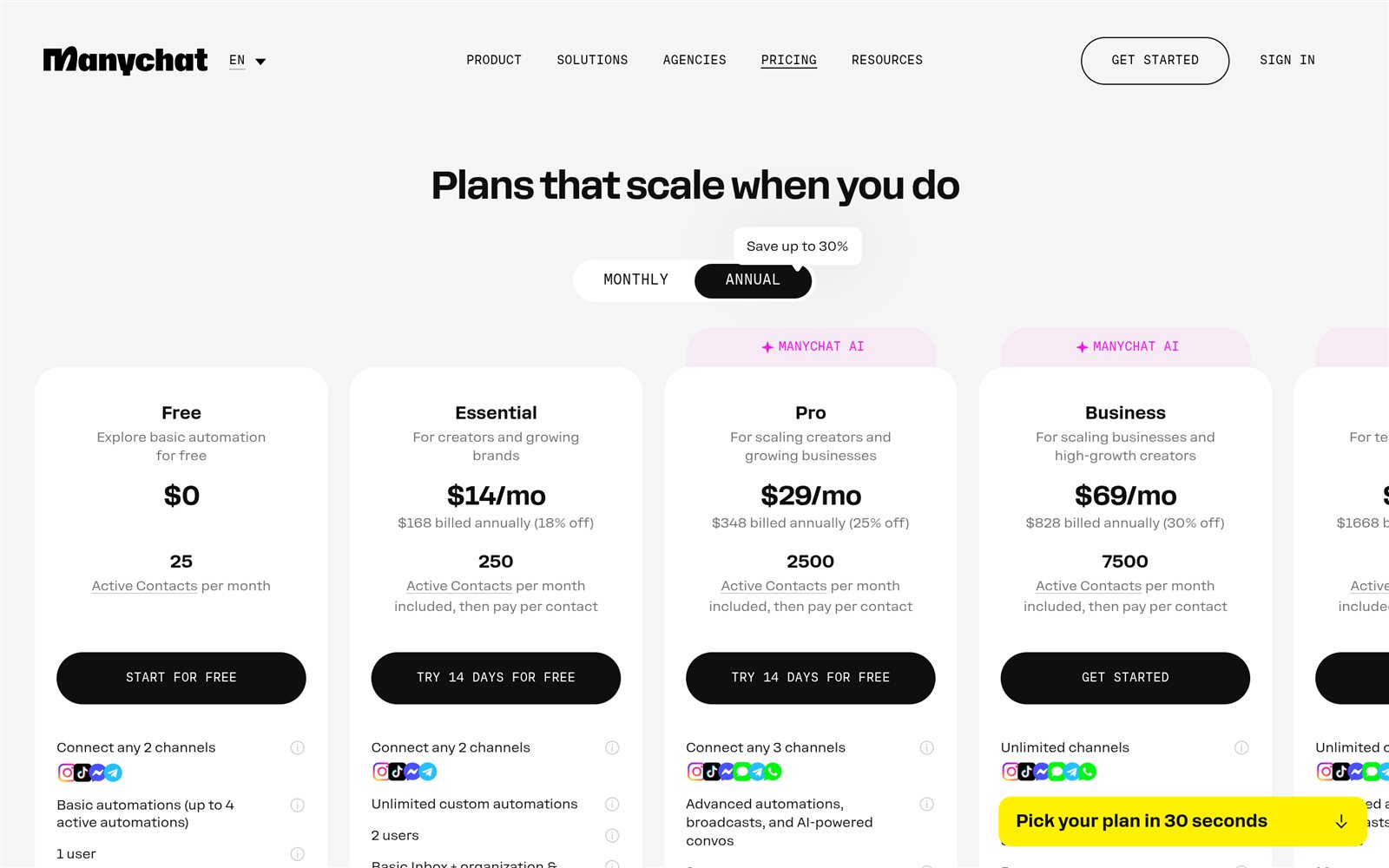
Feature gates are thinner than the contact gates. Free allows up to 4 active automations; Essential and everything above it list unlimited custom automations, so the automation count stops being a constraint after the first paid step.
Free also carries a "Powered by Manychat" line, which the page says appears the first time you message a contact. Every paid tier removes it.
An Active Contact is a person per month, not a message
Manychat's own wording: "An Active Contact is a real person you interact with during a monthly billing period... It doesn't matter how many messages you exchange. One person = one Active Contact for the month."
A contact counts as active when messages are sent or received through Manychat, whether that happens via automations, AI, Broadcasts or the Inbox. A long back-and-forth thread therefore costs exactly the same as one auto-reply.
This is a more forgiving meter than most list-based tools use, where a dormant subscriber bills every month forever. How other platforms count the same thing is set out in what a funnel builder's contact limit counts.
One clause is easy to miss. On annual plans, Active Contacts are still calculated monthly and any overages are billed monthly too, so paying for a year does not buy a yearly pool of contacts.
The overage rate is the real price of the cheap tier
Manychat publishes a per-contact rate for every paid plan rather than cutting automations off at the cap. The comparison table prints two rows, one for monthly billing and one for annual.
| Plan | Included contacts | Extra contact, monthly billing | Extra contact, annual billing |
|---|---|---|---|
| Free | 25 | N/A | N/A |
| Essential | 250 | $0.10 | $0.082 |
| Pro | 2,500 | $0.05 | $0.038 |
| Business | 7,500 | $0.025 | $0.018 |
| Advanced | 25,000 | $0.004 | $0.0028 |
Run the arithmetic on those published rates and the cheap tier stops being cheap fast. An Essential account that reaches 1,000 Active Contacts pays for 750 extra at $0.10, which is $75 on top of the plan under monthly billing.
Pro includes 2,500 contacts for $29. So once an Essential account expects to clear roughly 400 contacts a month, the upgrade costs less than the overage, by our arithmetic on the vendor's own figures.
The same break happens one tier up. A Pro account running at 7,500 contacts would owe 5,000 extra at $0.05, or $250 a month, against Business at $69 with 7,500 contacts included.
Advanced is where the rate collapses: $0.004 per extra contact monthly, roughly a sixth of Business's $0.025. Volume accounts should price that row before the headline, then price your own contact count on Manychat's plan page.
Manychat says the limit is not a wall. Its FAQ states that automations do not shut off, that notifications arrive by email and in-platform as the cap approaches, and that an overage threshold can be set to cap or forbid overages.
There is also a forgiveness clause: exceed the limit and upgrade within the same billing cycle, and the overage fees incurred so far are waived, with the extra contacts counting toward the new plan's allowance.
Channels are rationed by tier, and WhatsApp starts at Pro
Free and Essential each connect any 2 eligible channels. Pro connects any 3. Business and Advanced connect all of them. The published channel list is Instagram, TikTok, Facebook Messenger, Telegram, WhatsApp, SMS and Email.
The comparison table is stricter than the card copy. Instagram, Messenger, TikTok and Telegram are ticked on all five tiers, while WhatsApp, SMS and Email are marked unavailable on both Free and Essential.
So a $14 plan cannot send a WhatsApp message or an email at all. For anyone whose audience lives on WhatsApp, the entry price is Pro at $29 a month, not Essential at $14.
Email volume is capped where it is offered: up to 10,000 emails on Pro, 30,000 on Business and 100,000 on Advanced. Those ceilings are small next to dedicated senders, as covered in how to read an email automation pricing page.

Broadcasts, the proactive sends on WhatsApp, Telegram and Messenger, are listed from Pro upward as part of "advanced automations, broadcasts, and AI-powered convos." Free and Essential get reactive automation only.
Two official Manychat pages disagree on what the AI costs
The pricing page puts a "Manychat AI" badge on the Pro, Business and Advanced cards and lists AI as a plan feature on each, with no separate charge printed anywhere on the page.
The Manychat AI product page says the opposite. Its FAQ answer reads: "Manychat AI is an add-on to Manychat Pro, and costs $29/month," and a footnote on the same page reads "AI only available as add-on to Manychat Pro."
Both pages were read on October 21, 2026 and both are the vendor's own. The gap is $29 against $58 a month on Pro, which is large enough to settle in writing before the card is charged.
On what the AI does, the product page is specific: up to 250,000 characters of context about a business, AI Comments that require approval for every reply, AI Replies that preview recommended responses, plus intention recognition and a text rewriter.
What the pricing page does not print
The monthly-billed prices are the first gap. The page defaults to Annual and the monthly figures do not appear in its static content, so no monthly price is quoted here and none should be inferred from the annual numbers.
That a monthly option exists is not in doubt, because the overage table prices extra contacts separately for monthly and annual billing. Why the choice matters is covered in annual versus monthly billing.
Tax is the second gap. The page states that prices exclude tax and that the final figure depends on the billing country, visible only on the purchase page, so a sticker price is not a total.
The third is the G2 badge. Manychat's homepage and product pages show a 4.6/5 stars rating next to the G2 logo; G2's own review page returned a CAPTCHA notice on October 21, 2026, so the rating stands here as the vendor's claim, unverified.
Also unverified: anything about deliverability, approval times, or how Meta and TikTok partner status affects an individual account. No figure in this review comes from an account, and none is presented as a result.
Who each tier fits
- Free fits an account testing the mechanic. 25 Active Contacts a month, 4 active automations, 1 user, 2 channels, no credit card and a "Powered by Manychat" line on the first message.
- Essential at $14 fits a creator running Instagram or Messenger only, below roughly 400 contacts a month. Above that figure the $0.10 overage costs more than the Pro upgrade.
- Pro at $29 is the real entry tier for a business, because it is the first plan with WhatsApp, SMS, Email, Broadcasts and AI, plus 2,500 contacts and 3 users.
- Business at $69 fits a team: 7,500 contacts, 5 users, 3 Inbox seats, shared inbox with assignments and priority support. The shared inbox is the reason to move, not the contact count.
- Advanced at $139 fits volume. 25,000 contacts, 10 users and an overage rate of $0.004 monthly that is roughly a sixth of the Business rate.
- Skip it if the job is broadcast email to a list. The ceilings of 10,000 to 100,000 sends sit alongside a mail platform, not instead of one.
Frequently asked questions
Is Manychat really free?
Yes, with a hard ceiling. The Free plan is $0 with no credit card required, 25 Active Contacts a month, up to 4 active automations, 1 user and any 2 of Instagram, TikTok, Messenger or Telegram. Messages carry a "Powered by Manychat" line.
What counts as an Active Contact in Manychat?
One real person you interact with in a monthly billing period, regardless of message count. The clock is the billing month, so the same person can count again next month. Contacts count whether the message came from an automation, AI, a Broadcast or the Inbox.
What happens when I go over the contact limit?
Automations keep running and Manychat bills a per-contact overage: $0.10 on Essential, $0.05 on Pro, $0.025 on Business and $0.004 on Advanced under monthly billing. An overage threshold can be set, and upgrading within the same cycle waives fees already incurred.
Does Manychat include WhatsApp?
Only from Pro upward. The comparison table marks WhatsApp, SMS and Email as unavailable on Free and Essential. Pro connects any 3 eligible channels at $29 a month under the annual toggle; Business and Advanced connect all of them.
Is there a free trial or a refund?
Both are published. Essential and Pro can be tried free for 14 days, and the pricing FAQ states that a plan bought less than 30 days ago can be cancelled for a refund by messaging support. Annual plans cannot be switched to monthly until the term ends.
How much does Manychat AI cost?
The vendor's two pages disagree as of October 21, 2026. The pricing page lists AI as included on Pro, Business and Advanced; the Manychat AI page states it is a $29 a month add-on to Pro. Confirm at checkout before assuming either.
Do I still need an email tool alongside Manychat?
Usually yes, above small volumes. Email is capped at 10,000 sends on Pro, 30,000 on Business and 100,000 on Advanced, and is unavailable below Pro. Pair it with a sender as described in how to build a welcome email sequence.
Bottom line
Manychat's meter is the best thing on the page. Charging once per person per month, rather than per message or per stored subscriber, matches how DM automation actually behaves and is friendlier than most list-priced alternatives.
The trap is the published overage rate, not the headline. At $0.10 per extra contact, Essential passes Pro in cost somewhere around 400 contacts a month, so the tier to buy is the one that clears a realistic contact count.
Two things should be settled before paying: the monthly-billed price, which the page does not print on its default toggle, and whether Manychat AI is included on Pro or a $29 add-on, which two official pages answer differently.
Start on the free tier and price up from the published rates, then read the cap your own numbers break first, using the method in how to read a funnel builder pricing page.
Related reading: what "unlimited" means on a plan page, the funnel builder free trial checklist, ClickFunnels vs systeme.io and ActiveCampaign vs Mailchimp plan limits.
Sources
- Manychat pricing (tier prices, annual totals, Active Contact allowances, overage rates, channel table, FAQ) (checked Oct 21, 2026)
- Manychat homepage (positioning, Meta Business Partner and TikTok Marketing Partner badges, G2 4.6/5 badge) (checked Oct 21, 2026)
- Manychat AI product page ("add-on to Manychat Pro, and costs $29/month", 250k characters of context) (checked Oct 21, 2026)
- Manychat for Instagram (channel positioning and partner badges) (checked Oct 21, 2026)